Livepeer offers detailed information on viewer behavior and playback quality on
your platform. The API includes engagement metrics such as view counts and watch
time, as well as performance metrics such as error rate, time to first frame,
rebuffer ratio, and exit-before-starts across a variety of dimensions.
Usage Metrics
This API also includes usage metrics to help you understand how viewers are
engaging with your platform:
- Number of Views: This metric gives you a comprehensive view of the total
number of views across your platform. We colloquially define a view as “play
intent”, which means the video either played, stalled, or encountered an
error.
- Minutes of Watch Time: Measure the total amount of time viewers spend on your
platform, so you can track engagement and identify areas for improvement.
This API offers several key performance metrics to help you understand your
platforms performance:
- Error Rate: Percentage of views that encountered an error.
- Time to First Frame (TTFF): Measures the time in milliseconds it takes between
the player requesting video and the first frame being ready to play.
- Rebuffer Ratio: Percentage of time a viewer spends experiencing rebuffering
during playback.
- Exit Before Starts: Percentage of views that are abandoned before the video
begins to play, potentially indicating issues with playback.
Dimensions
To provide a comprehensive view of viewer behavior, our data product includes
several dimensions to help you segment your data and identify patterns:
- Video: View metrics for individual videos, queryable by playback ID or by
dStorage ID’s, such as CID.
- Browser: Understand how different browsers impact viewer behavior and
performance, so you can optimize your platform for each browser type.
- Device: Understand how different devices impact viewer behavior, so you can
optimize your platform for each device type.
- OS: Understand how different operating systems impact viewer behavior, so you
can optimize your platform for each OS.
- Continent, Country, and Subdivisions: Segment your data by location to
identify regional trends and tailor your platform to local preferences.
- Time Zone: Measure viewer behavior across different time zones, so you can
optimize your platform for peak usage times.
- Time: Analyze viewer behavior across different time periods (hour, day, week,
month, year, all-time) to identify trends.
Please note that data is refreshed every 5 minutes and newly uploaded videos
may take up to an hour before viewership data is available
Registering views
Livepeer Player
Custom Player
To collect and register viewership metrics, you first need to configure your
player. We recommend that you use the
Livepeer player to get viewership metrics,
as it comes fully configured. You can follow the Player guide to get started. We also support viewership metrics for applications using custom players. In
order for metrics to be tracked by Livepeer, you will need to configure your
player using addMediaMetrics.Here’s how to configure your player:import { addMediaMetrics } from "@livepeer/core-web/media/browser";
const source =
"https://livepeercdn.studio/recordings/bd600224-d93a-4ddc-a6ac-2d71e3c36768/index.m3u8";
const video = document.getElementById("my-video");
// set up your player before calling addMediaMetrics
addMediaMetrics(video, source, (e) => console.error("Error adding metrics", e));
import { addMediaMetrics } from "@livepeer/core-web/media/browser";
import React, { useEffect, useRef, useState } from "react";

export default function VideoPlayer() {
  const videoRef = useRef(null);
  const [source, setSource] = useState(
    "https://livepeercdn.studio/recordings/bd600224-d93a-4ddc-a6ac-2d71e3c36768/index.m3u8"
  );

  useEffect(() => {
    if (videoRef.current) {
      // set up other stuff in your player before calling addMediaMetrics
      const metrics = addMediaMetrics(videoRef.current, source, (e) =>
        console.error("Error adding metrics", e)
      );
      return metrics?.destroy;
    }
  }, [videoRef, source]);

  return (
    <video
      controls
      ref={videoRef}
      src={source}
      style={{ width: "100%", maxWidth: "500px" }}
    />
  );
}
Retrieving views from the Dashboard
The Livepeer Studio Dashboard is a frontend interface for publishing live or
on-demand video streams with no code. In this guide, we’ll show you how to use
the dashboard to retrieve viewership metrics.
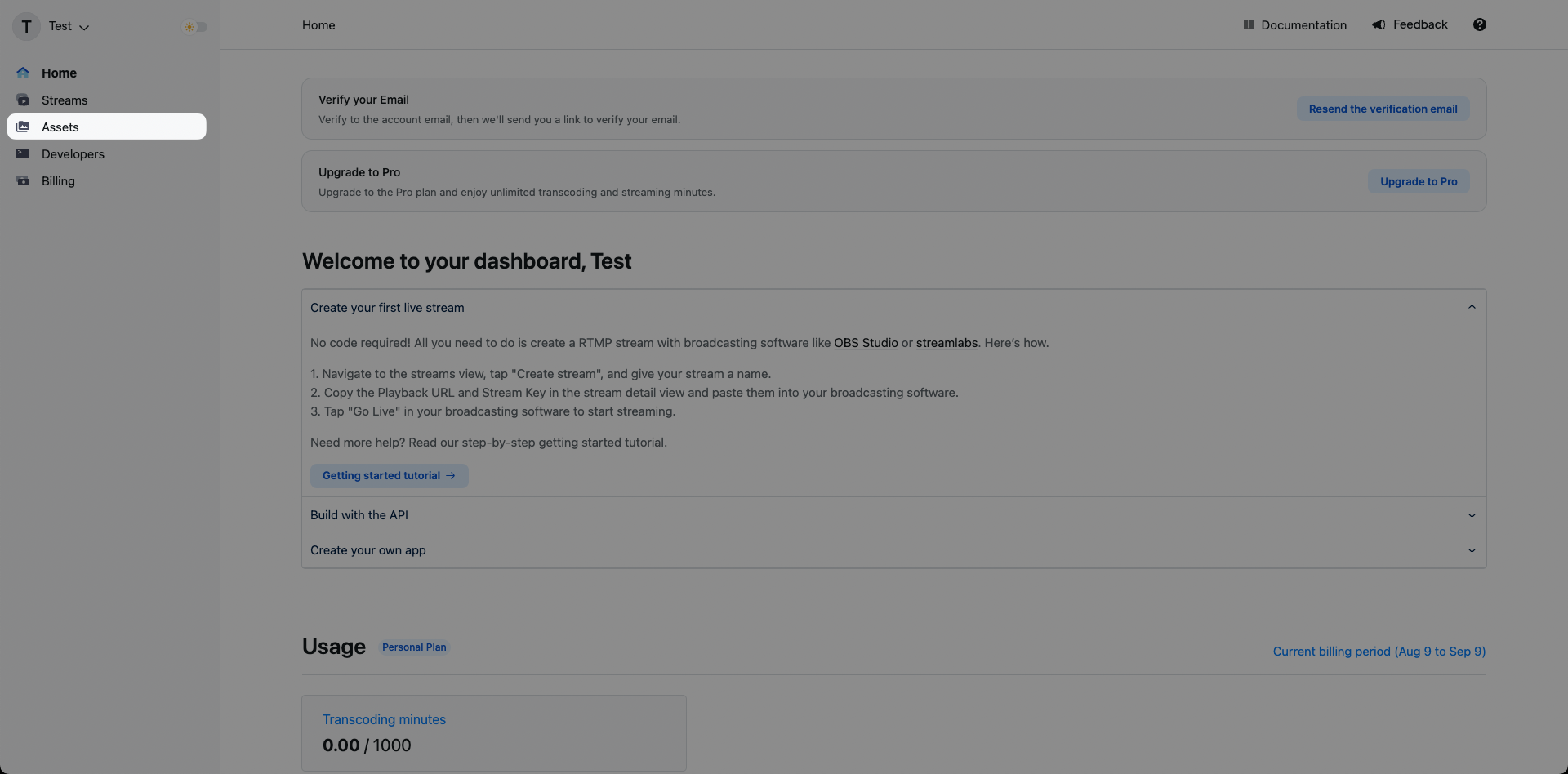
Navigate to the assets page
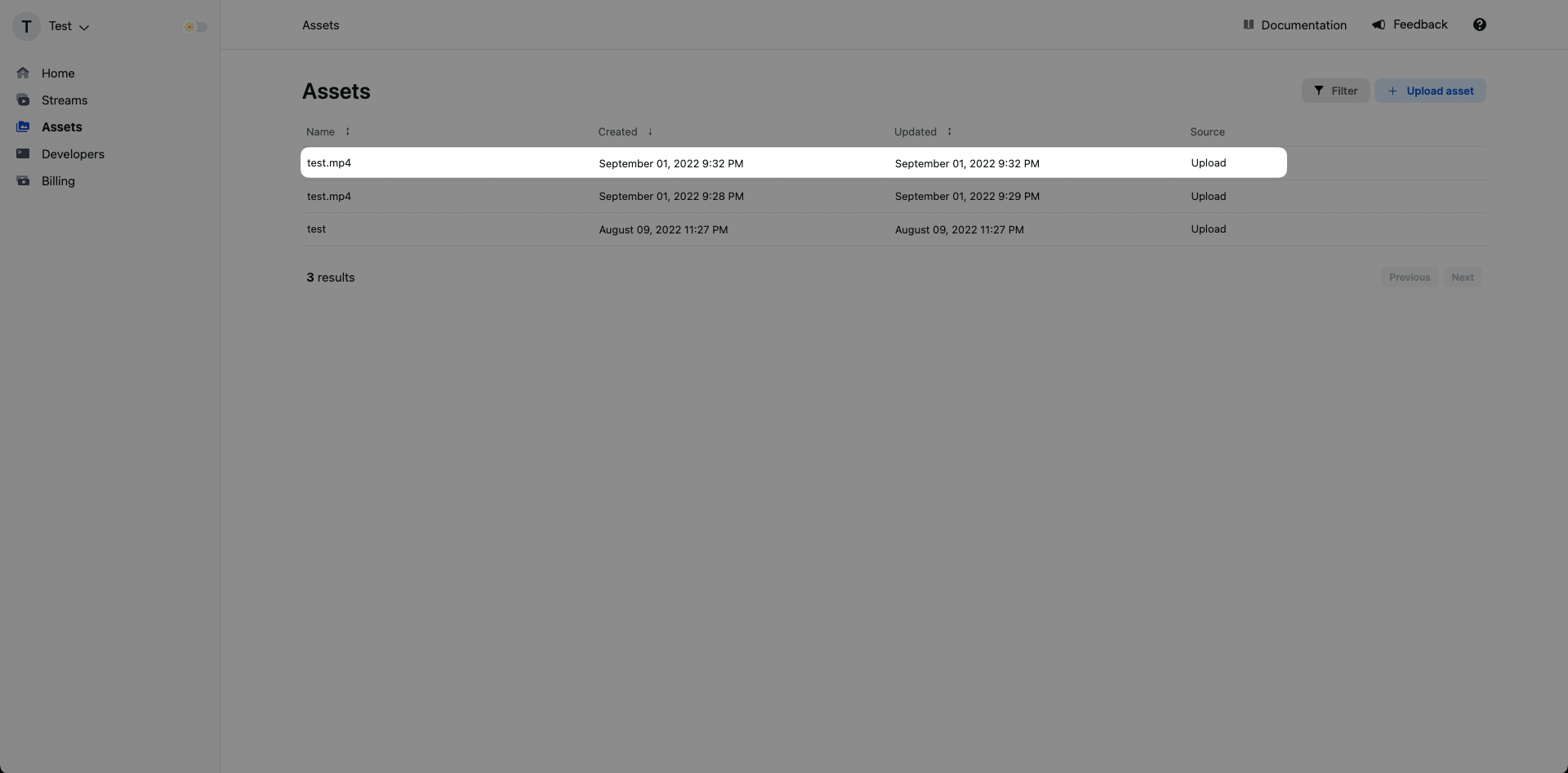
Click on an existing asset
Click on an existing asset and you’ll be brought to that asset’s specific
details page. If you haven’t created an asset yet, you can follow the
upload a video asset guide.
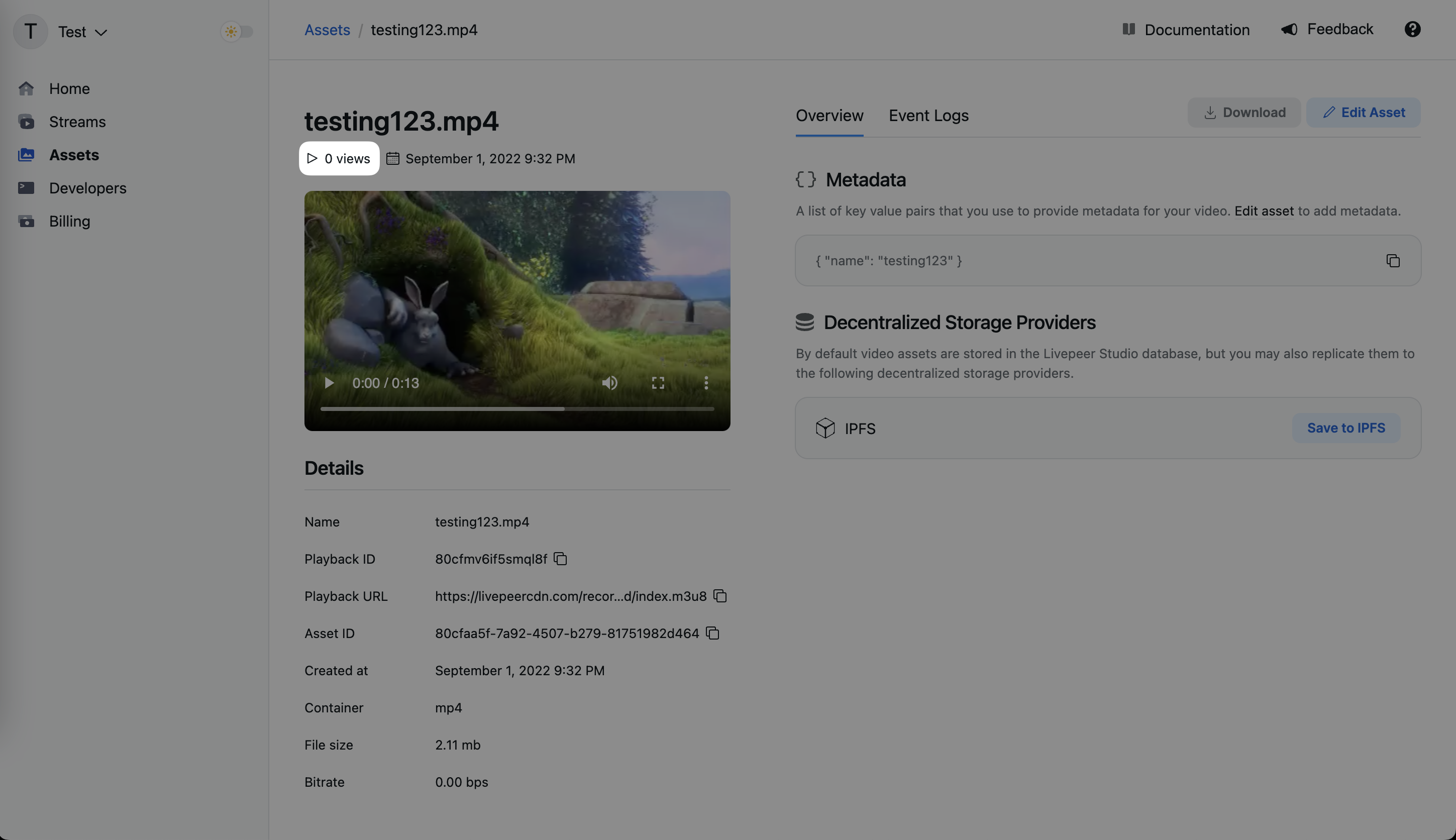
View your asset’s viewership metrics
In the asset’s specific detail page you can view its total number of views.
Retrieving views from the API
Get the playbackId of an existing asset
Get the playbackId of an existing asset. A playbackId can be found in the
asset page on the dashboard or from any Asset API call. If you haven’t created
an asset yet, you can follow the
upload a video asset guide.
The playbackId can be a canonical playback ID from a specific Livepeer asset
or stream objects, or dStorage identifiers for assets. Queries by dStorage ID
are universal/cross-account, as explained below, so check what makes the most
sense for your app.
ipfs:// or ar:// URLs, or CID/txID), you
will get views for all assets with that dStorage ID across any Livepeer account.
This is useful to display global metrics from a video. To display the viewership
metrics only from the videos in your account, use the API objects playbackId.
Retrieve viewership data
Once you have the playbackId, you can make a request to get the viewership
data.
Node.js
Python
Ruby
PHP
Go
import { Livepeer } from "livepeer";

const apiToken = 'YOUR_API_TOKEN';
const playbackId = 'PLAYBACK_ID';

const livepeer = new Livepeer(apiToken);

livepeer
  .getTotalViews(playbackId)
  .then((response) => {
    console.log("Total views:", response);
  })
  .catch((error) => {
    console.error("Error fetching total views:", error);
  });
from livepeer import Livepeer

# Initialize the Livepeer client with your API token
api_token = "YOUR_API_TOKEN"
livepeer = Livepeer(api_token)

# Define the playback ID you want to query
playback_id = "PLAYBACK_ID"

try:
    # Get total views by playback ID
    response = livepeer.get_total_views(playback_id)
    print("Total views:", response)
except Exception as e:
    print("Error fetching total views:", e)
require 'livepeer'

# Initialize the Livepeer client with your API token
api_token = 'YOUR_API_TOKEN'
client = Livepeer::Client.new(api_key: api_token)

# Define the playback ID you want to query
playback_id = 'PLAYBACK_ID'

begin
  # Get total views by playback ID
  response = client.get_total_views(playback_id)
  puts 'Total views:', response
rescue StandardError => e
  puts 'Error fetching total views:', e.message
end
<?php

require 'vendor/autoload.php';

use Livepeer\Livepeer;
use Livepeer\LivepeerException;

// Initialize the Livepeer client with your API token
$api_token = 'YOUR_API_TOKEN';
$livepeer = new Livepeer($api_token);

// Define the playback ID you want to query
$playback_id = 'PLAYBACK_ID';

try {
    // Get total views by playback ID
    $response = $livepeer->getTotalViews($playback_id);
    echo 'Total views: ' . json_encode($response) . PHP_EOL;
} catch (LivepeerException $e) {
    echo 'Error fetching total views: ' . $e->getMessage() . PHP_EOL;
}
package main

import (
  "fmt"
  "os"

  "github.com/livepeer/go-sdk"
)

func main() {
  // Initialize the Livepeer client with your API token
  apiToken := "YOUR_API_TOKEN"
  client := livepeer.NewLivepeerClient(apiToken)

  // Define the playback ID you want to query
  playbackID := "PLAYBACK_ID"

  // Get total views by playback ID
  response, err := client.GetTotalViews(playbackID)
  if err != nil {
    fmt.Printf("Error fetching total views: %v\n", err)
    os.Exit(1)
  }

  fmt.Printf("Total views: %+v\n", response)
}
Diving deeper
If you’re happy with the above metrics you can stop here. If you want to build
more advanced analytics, you can use the following API endpoints to get more
detailed data.
This API can be called from the frontend to retrieve detailed engagement metrics
for a specific resource. The only restriction it has is that it has to be called
with an assetId or streamId values, which are private values today that only
the asset creator should have access. Soon this creator ownership will be
validated using wallet signatures instead.
The idea for this API is to build creator analytics dashboards. It can be called
from the frontend and can provide detailed insights to creators about their
assets and streams.
Node.js
Python
Ruby
PHP
Go
import { Livepeer } from "livepeer";

const apiToken = 'YOUR_API_TOKEN';
const assetId = 'ASSET_ID';
const timeStep = 'day';
const breakdownBy = ['timezone'];

const livepeer = new Livepeer(apiToken);

const queryParams = {
  assetId: assetId,
  timeStep: timeStep,
  breakdownBy: breakdownBy
};

livepeer
  .getViewsByCreator(queryParams)
  .then((response) => {
    console.log("Views by creator:", response);
  })
  .catch((error) => {
    console.error("Error fetching views by creator:", error);
  });
from livepeer import Livepeer

# Initialize the Livepeer client with your API token
api_token = "YOUR_API_TOKEN"
livepeer = Livepeer(api_token)

# Define the asset ID for which you want to query views
asset_id = "ASSET_ID"
time_step = "day"  # Define the time step
breakdown_by = ["timezone"]  # Define the breakdown criteria

query_params = {
    "assetId": asset_id,
    "timeStep": time_step,
    "breakdownBy": breakdown_by
}

try:
    # Get views by creator
    response = livepeer.get_views_by_creator(query_params)
    print("Views by creator:", response)
except Exception as e:
    print("Error fetching views by creator:", e)
require 'livepeer'

# Initialize the Livepeer client with your API token
api_token = 'YOUR_API_TOKEN'
client = Livepeer::Client.new(api_key: api_token)

# Define the asset ID for which you want to query views
asset_id = 'ASSET_ID'
time_step = 'day'  # Define the time step
breakdown_by = ['timezone']  # Define the breakdown criteria

query_params = {
  'assetId' => asset_id,
  'timeStep' => time_step,
  'breakdownBy' => breakdown_by
}

begin
  # Get views by creator
  response = client.get_views_by_creator(query_params)
  puts 'Views by creator:', response
rescue StandardError => e
  puts 'Error fetching views by creator:', e.message
end
<?php

require 'vendor/autoload.php';

use Livepeer\Livepeer;
use Livepeer\LivepeerException;

// Initialize the Livepeer client with your API token
$api_token = 'YOUR_API_TOKEN';
$livepeer = new Livepeer($api_token);

// Define the asset ID for which you want to query views
$asset_id = 'ASSET_ID';
$time_step = 'day';  // Define the time step
$breakdown_by = ['timezone'];  // Define the breakdown criteria

$query_params = [
  'assetId' => $asset_id,
  'timeStep' => $time_step,
  'breakdownBy' => $breakdown_by
];

try {
    // Get views by creator
    $response = $livepeer->getViewsByCreator($query_params);
    echo 'Views by creator: ' . json_encode($response) . PHP_EOL;
} catch (LivepeerException $e) {
    echo 'Error fetching views by creator: ' . $e->getMessage() . PHP_EOL;
}
package main

import (
  "fmt"
  "os"

  "github.com/livepeer/go-sdk"
)

func main() {
  // Initialize the Livepeer client with your API token
  apiToken := "YOUR_API_TOKEN"
  client := livepeer.NewLivepeerClient(apiToken)

  // Define the asset ID for which you want to query views
  assetID := "ASSET_ID"
  timeStep := "day" // Define the time step
  breakdownBy := []string{"timezone"} // Define the breakdown criteria

  queryParams := map[string]interface{}{
    "assetId":      assetID,
    "timeStep":     timeStep,
    "breakdownBy":  breakdownBy,
  }

  // Get views by creator
  response, err := client.GetViewsByCreator(queryParams)
  if err != nil {
    fmt.Printf("Error fetching views by creator: %v\n", err)
    os.Exit(1)
  }

  fmt.Printf("Views by creator: %+v\n", response)
}
Node.js
Python
Ruby
PHP
Go
import { Livepeer } from "livepeer";

const apiToken = 'YOUR_API_TOKEN';
const breakdownBy = ['device', 'browser']; // Define the breakdown criteria

const livepeer = new Livepeer(apiToken);

const queryParams = {
  breakdownBy: breakdownBy
};

livepeer
  .getViews(queryParams)
  .then((response) => {
    console.log("Views:", response);
  })
  .catch((error) => {
    console.error("Error fetching views:", error);
  });
from livepeer import Livepeer

# Initialize the Livepeer client with your API token
api_token = "YOUR_API_TOKEN"
livepeer = Livepeer(api_token)

breakdown_by = ["device", "browser"]  # Define the breakdown criteria

query_params = {
    "breakdownBy": breakdown_by
}

try:
    # Get views
    response = livepeer.get_views(query_params)
    print("Views:", response)
except Exception as e:
    print("Error fetching views:", e)
require 'livepeer'

# Initialize the Livepeer client with your API token
api_token = 'YOUR_API_TOKEN'
client = Livepeer::Client.new(api_key: api_token)

breakdown_by = ['device', 'browser']  # Define the breakdown criteria

query_params = {
  'breakdownBy' => breakdown_by
}

begin
  # Get views
  response = client.get_views(query_params)
  puts 'Views:', response
rescue StandardError => e
  puts 'Error fetching views:', e.message
end
<?php

require 'vendor/autoload.php';

use Livepeer\Livepeer;
use Livepeer\LivepeerException;

// Initialize the Livepeer client with your API token
$api_token = 'YOUR_API_TOKEN';
$livepeer = new Livepeer($api_token);

$breakdown_by = ['device', 'browser'];  // Define the breakdown criteria

$query_params = [
  'breakdownBy' => $breakdown_by
];

try {
    // Get views
    $response = $livepeer->getViews($query_params);
    echo 'Views: ' . json_encode($response) . PHP_EOL;
} catch (LivepeerException $e) {
    echo 'Error fetching views: ' . $e->getMessage() . PHP_EOL;
}
package main

import (
  "fmt"
  "os"

  "github.com/livepeer/go-sdk"
)

func main() {
  // Initialize the Livepeer client with your API token
  apiToken := "YOUR_API_TOKEN"
  client := livepeer.NewLivepeerClient(apiToken)

  breakdownBy := []string{"device", "browser"} // Define the breakdown criteria

  queryParams := map[string]interface{}{
    "breakdownBy": breakdownBy,
  }

  // Get views
  response, err := client.GetViews(queryParams)
  if err != nil {
    fmt.Printf("Error fetching views: %v\n", err)
    os.Exit(1)
  }

  fmt.Printf("Views: %+v\n", response)
}
Visualizing Your Data
If you are ready to take a deep dive into your data, then visualizations are the
next step. We have put together a tutorial complete with templates to get you
started.
Visualize Engagement Metrics with Grafana
If you are interested in visualizing your engagement metrics with Grafana, feel
free to check out our tutorial,
Visualize Engagement Metrics with Grafana,
to learn more.